
 3.5 mm
Wired in-ear sound
The cord is ready when you are
We build one type of audio gear and keep it simple. Two plugs fit the devices in your pocket and on your desk, every cord carries a microphone, and there is nothing to recharge.
 Ferox wired earbuds, two pack$13.99 to $17.99
What the wire gives you back
- 01
No dead battery
The cord draws power straight from the port. A phone call will not drop out because a charge ran out.
- 02
No pairing menu
You never have to scroll through a list of connections. Push the pin in and sound comes through right away.
- 03
No pocket dropouts
The signal stays steady while you walk. Moving the phone from one pocket to another does not cut the voice off.
- 04
No audio lag
What you see matches what you hear. A wire carries the voice to your ear with no delay on a clip or a game.
Start with the port on your device
Check the hole on your phone or laptop before you pick a shape. The plug decides whether the pair works, while the line only decides how the earpiece fits and rests in the ear.
The round headphone jack
This is the traditional pin that goes into laptops, older phones, tablets and game controllers. An adapter lets it fit other ports, but we do not include one in the box because it is an extra piece to misplace.
12 on this shelf, from $8.69
The USB-C connector
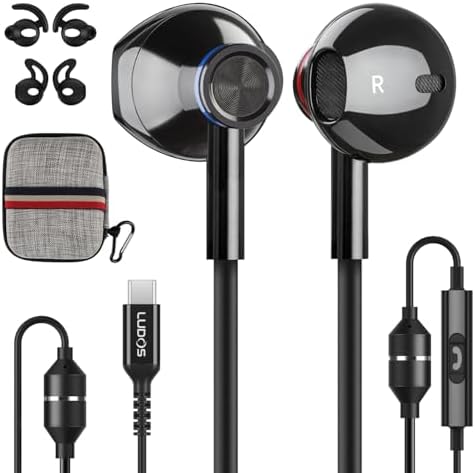
This flat connector goes straight into modern phones and tablets that left off the round socket. It plugs directly into the bottom of the device, so you need no dongle between the cord and the port.
7 on this shelf, from $9.99
Ear tips on their own
Foam wears out. The driver behind it usually has years left. This is the part you replace rather than the pair, and it is the cheapest thing on this site.
1 on this shelf, from $7.99
Find your match by port and use
Tell us which socket sits on your device and how you plan to listen. We will show the right plug and line right away.
Our named lines
Choose the plug that matches your port, then choose the shape you want. The line decides the housing metal, the cord braid and the button setup under your thumb.
 Zenithour plainest pair and the cheapest way into the catalog: a smooth rounded housing, nothing on the cable, nothing to learn
- Feroxthe pair built around a thin wire you stop noticing after the first hour, the one people keep a spare of because losing it costs nothing
 Omnitonethe pair we shaped for talking: a soft earpiece that sits in the ear through a long call, and a fit that keeps the room out of the microphone
 Ultrathe tough one, with a longer cord and a microphone aimed at people who talk while they play
- Clamora metal housing with memory foam tips and one button on the cable, sized with smaller ears in mind
 Clamor 2 Promemory foam tips and a braided cable, with magnets set in the housings so the two buds clip to each other and hang around the neck instead of knotting in a bag
 Novathe general purpose pair for a desk, a laptop and a working day, made to be worn for hours rather than minutes
 Spectathe pair with the controls on the cable: volume, track and calls under the thumb, so the phone stays in the pocket
- Comfyreplacement memory foam tips on their own, washable, sold to bring an older pair back rather than to replace it
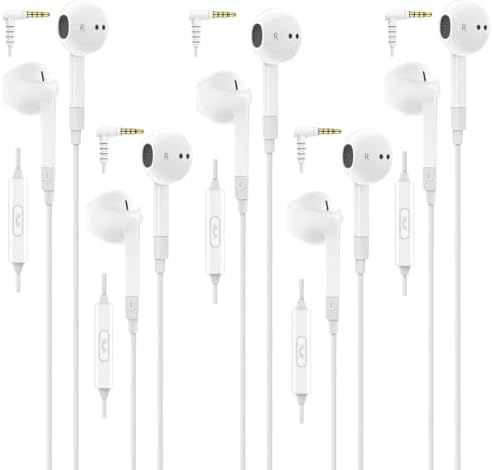
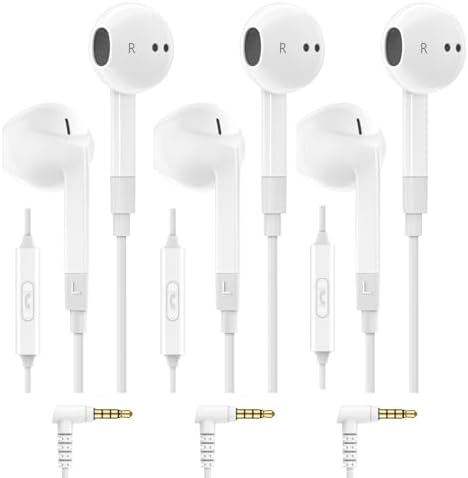

Pairs for the round jack
Made for laptops, game pads, and devices with the classic audio socket. Built with an on-cord microphone and passive noise isolating tips.
Match your device port
Tell us what port your hardware uses and how you plan to wear your audio. We point you to the plug and the earpiece that match.



A catalog built around the wire
We keep our catalog small and focused on wired sound. These counts show the options across our plugs, colors, and builds.
- 20housings on the shelf, each one its own listing
- 136color codes behind them, every one with its own page on the shelf
- 9named lines, spread across both plug types
- 138,727votes left by people who took a pair home
How we make this line
One plain focus
We make wired in-ear pairs and replacement tips, and we stay with what works. There are no wireless buds here to chase down or recharge.
The tip matters
Sound changes completely when a tip fails to seal the ear canal. We include spare foam tips and offer them alone so you can fix an older set.
Low cost replacements
Losing a pair in a seat cushion should not ruin an afternoon. We build these to work well on a call and cost little when lost.
Three steps to your pair
- Check your portLook at the bottom of the phone or tablet. Pick the round headphone jack or the USB-C plug to match it directly.
- Pick your lineThink about where the cord will go. Some pairs carry braided cables or clip magnets, while others keep the wire thin.
- Seal the earTry the tips in the box until the canal is closed off. A loose tip loses the low notes, so swap sizes right away.
The full lineup in one place
Use this layout to compare housings, cord types, and controls across our named lines before picking a plug.
| Line | Plug | From | Votes |
|---|---|---|---|
| Zenith | 3.5 mm, USB-C | $8.69 | 6,451 |
| Ferox | 3.5 mm, USB-C | $8.99 | 41,256 |
| Omnitone | 3.5 mm, USB-C | $12.99 | 9,120 |
| Ultra | 3.5 mm, USB-C | $18.99 | 21,152 |
| Clamor | 3.5 mm, USB-C | $19.99 | 38,879 |
| Clamor 2 Pro | 3.5 mm, USB-C | $17.99 | 8,350 |
| Nova | 3.5 mm, USB-C | $17.99 | 5,561 |
| Specta | 3.5 mm | $19.99 | 5,698 |
| Comfy | Tips | $7.99 | 2,260 |
One pair pulled from the shelf
Clamor wired earbuds, 3.5 mm
4.3 out of 5 from 38,638 votes
Pop the jack into your laptop or older phone and you have sound right away. We built these with smaller ears in mind, tucking the drivers into compact metal shells that sit flush. Memory foam tips squeeze down and expand to block room chatter without batteries.
Habits that keep a cord working
Good habits
- Pinch the hard plastic of the plug to pull it from the socket.
- Wrap the cord in loose circles around three fingers when storing it.
- Rinse the foam tips with warm water and let them air dry before use.
- Store the buds in a pocket away from heavy gear and loose keys.
Common mistakes
- Pulling on the thin wire to yank the plug out of a phone port.
- Winding the cable tightly around the body of a phone or controller.
- Using old flattened tips and assuming the driver lost its low end.
- Tossing the bare jack into a bag bottom full of grit and lint.
What are you doing with them
Six situations people write to us about. Each one names the line we would hand over first.
Talking to people
Calls, meetings, a microphone in front of your face for half the morning.
Start with OmnitoneA long day at a desk
Hours at a stretch rather than minutes, where comfort beats everything else.
Start with NovaCarrying them everywhere
In and out of a bag or a coat pocket daily, usually in a hurry.
Start with Clamor 2 ProFighting to keep them in
They work loose, ache after an hour, or seal on one side and not the other.
Start with ClamorReaching for the volume
Changing the sound without digging the phone out of a coat every time.
Start with SpectaNothing, I keep the pair I own
The foam has gone flat and the bottom end quietly left with it.
Start with Comfy
The wire does the work
We make wired in-ear earbuds and replacement tips, nothing else. Every cord carries a microphone because a pair without one is half a pair on a call. We put spare tips in every box because an open seal ruins the low end, and we print plain facts beside each pair instead of big claims.
Picking a cord when ports keep changing
The port on your device settles the choice before you read about housings or cords. If your phone or tablet has no round port, pick a pair with USB-C so you plug straight in. An adapter works, but it is one more tiny piece to leave behind on a train, lose in a couch, or break in a pocket.
Some people come here to replace a dead pair before morning. Others want a spare to leave plugged into a work laptop or hand to a kid in the back of the car. If you need a daily backup, start with the plug that fits your machine and look at the shape of the housing next.
| 3.5 mm jack | The small round hole has been on the end of headphones for most of a century, and it is still on the side of most laptops. If that is the socket you are plugging into, this shelf is the whole answer. |
|---|---|
| USB-C | When the round hole left phones, the charging port had to carry sound as well. These are the pairs built to plug straight into it, with no adapter in the middle. |
| Ear tips | Foam wears out. The driver behind it usually has years left. This is the part you replace rather than the pair, and it is the cheapest thing on this site. |
- Our shelf runs from $7.99 to $44.99, and nothing on it needs charging.
- 20 housings carry 136 separate color codes between them.
- 7 of those housings plug straight into a USB-C port with no adapter in the middle.
- Every pair on the shelf has a microphone and in-line buttons except the foam tips, which are a spare part rather than a pair.
| Zenith | our plainest pair and the cheapest way into the catalog: a smooth rounded housing, nothing on the cable, nothing to learn |
|---|---|
| Ferox | the pair built around a thin wire you stop noticing after the first hour, the one people keep a spare of because losing it costs nothing |
| Omnitone | the pair we shaped for talking: a soft earpiece that sits in the ear through a long call, and a fit that keeps the room out of the microphone |
| Ultra | the tough one, with a longer cord and a microphone aimed at people who talk while they play |
| Clamor | a metal housing with memory foam tips and one button on the cable, sized with smaller ears in mind |
| Clamor 2 Pro | memory foam tips and a braided cable, with magnets set in the housings so the two buds clip to each other and hang around the neck instead of knotting in a bag |
| Nova | the general purpose pair for a desk, a laptop and a working day, made to be worn for hours rather than minutes |
| Specta | the pair with the controls on the cable: volume, track and calls under the thumb, so the phone stays in the pocket |
| Comfy | replacement memory foam tips on their own, washable, sold to bring an older pair back rather than to replace it |
Finding your pair
Start with the plug, not the name of a line. Check whether your phone or laptop takes the round jack or the USB-C plug, then let our device tool narrow the page down to the pairs that fit it directly.
If you take calls all day, Omnitone sits softly in the ear. If you already have a pair you like whose tips have grown hard, Comfy foam tips bring that older pair back without buying another cord.
Heard from the desk and the commute
I keep Clamor 2 Pro in my bag because the magnets hold the buds together and the wire stays untangled.
Marcus T., on the train each morningOmnitone stays in my ear through four hours of calls and I never have to check a battery indicator.
Elena R., at a shared office deskSpecta lets me pause audio and change the volume from the cord while my phone stays deep in my coat.
David K., walking in the city
Questions about fit and cords
Can I use a pair with a round jack on a device that only has USB-C?
You can if you attach an adapter between the cord and the port. It works for audio and the microphone, but it adds another small piece that can wobble loose in a pocket or get lost in a bag. Picking a native USB-C pair is simpler.
Do these block all outside sound?
No, because the isolation is passive. The seal of the tip blocks background hum, but louder noises still reach you. You will still hear a train announcement, a knock on the office door, or someone calling your name across the room.
Why does the sound seem flat and thin?
A loose tip leaks the low frequencies before they reach your ear. Squeeze the foam tip, put it in, and let it expand for a few seconds to fill the canal. Once the seal is tight, the full body of the sound comes right back.
Does the microphone work when plugged into a computer?
Yes, on any computer with a combined audio jack or a working USB-C port. The microphone sits at chin height on the cord and picks up speech clearly for work meetings, voice notes, and online games without extra setup.
What should I do if one earbud stops playing sound?
Check the nozzle first, as wax or dust often blocks the small metal mesh under the foam tip. Clean the opening gently with a dry cotton swab, then inspect the cord near the plug to ensure the wire is not bent sharply.
Workbench articles
We wrote down the answers we give most often about plugs, foam seals, cord care, and what to look for when a wire wears out.
Which plug your phone takes
One look at the bottom edge of the phone settles which of our pairs will work. Here is what changed, what an adapter costs you, and why laptops are a different story.
Keep readingGetting a seal with ear tips
Sound that came out thin and tinny is almost never a broken driver. It is a tip that never closed the ear canal. How to seat foam properly and when to swap.
Keep readingHow a wired pair stays quiet
No circuit, no battery, no cancellation. Just a foam tip filling the canal. What that blocks well, what it will not touch, and why we left the battery out.
Keep readingThe cable is the weak point
Drivers rarely fail. Cords fail, and nearly always at the same three bends. What kills a cable, how to pull a plug, and how to wind a cord that will not knot.
Keep readingWhat the in-line buttons do
One button, three buttons, or none at all. What each press does, why the microphone sits where it does, and which parts your phone decides rather than the cord.
Keep readingA pair for school and the desk
Why school supply lists still say wired, what makes a good desk pair different from a pocket pair, and the case for buying two of the same cheap thing on purpose.
Keep reading
The complete collection in one storefront
Our entire catalog stands in one central storefront, with both plug types, all named lines, and replacement foam tips together. You can see every color and style side by side without bouncing between separate pages.
Where we read your questions
Our team sits at this bench to answer questions about device fit, check why a tip fails to seal, and test how our cords hold up over time. We read every note that comes across the desk.
LUDOS1033 Demonbreun Street, Suite 300Nashville, TN 37203
[email protected]
Ready to pick your cord
Choose your plug, try the device helper, or look over the named lines to find the pair that fits your pocket.